When a post fails
Where failures show up, how to retry, what to do after you reconnect, and posts Pombo couldn't confirm.
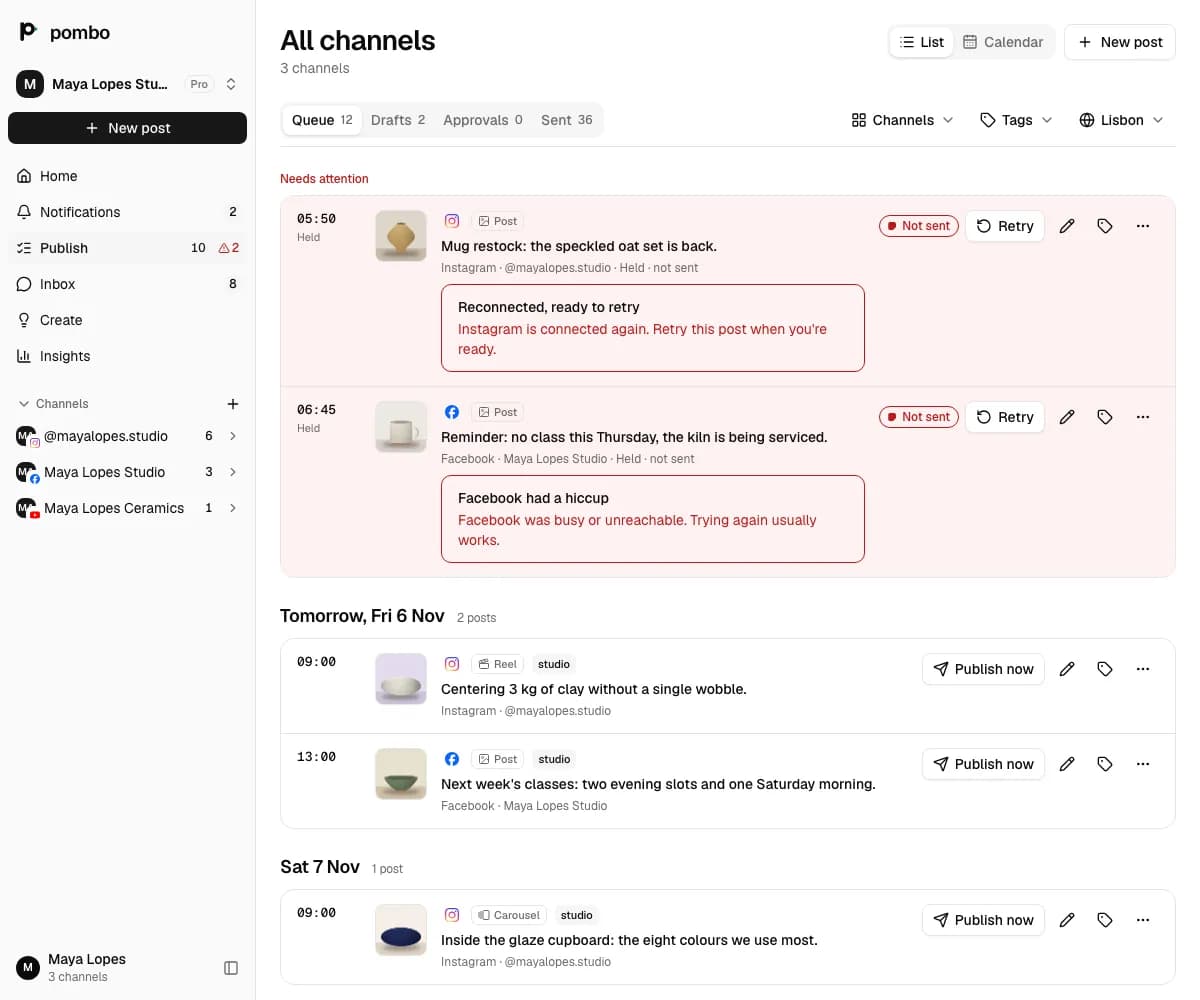
Where failures show up
- Publish: the post appears under Needs attention with the reason. Common reasons are "Instagram login expired", "Instagram had a hiccup" and "Instagram rejected this post". Other networks show their own name.
- Notifications: the post is pinned as "Post failed on …".
Fixing it
- Retry sends the post again within a minute.
- Rejected posts can't be retried. Edit them first.
After a reconnect: posts on a channel whose login ran out show Held · not sent. They don't go out on their own when you reconnect. Go back to Settings → Channels: a reconnected channel shows Retry N failed posts. It opens Publish showing only that channel's failed posts, where Retry sends up to 25 at a time. They go out within a minute. If your posts need approval, retry them one at a time.
Couldn't confirm it went out: sometimes the network doesn't answer in time, so the post may already be live.
- Press Check on Instagram (or Facebook, or YouTube) on the post.
- If Pombo finds the post, it marks it as published.
- If it doesn't, check the network yourself before you retry, so you don't post twice.
Emails: Email notifications are coming soon. Until then, failures show in Notifications and in Publish. You can already choose them in Settings → Preferences → Email notifications, separately for each workspace.